In this article
From Spreadsheet to HRIS: What Spreadsheet Failures Show and How to Decide When to Switch
Sources checked: November 9, 2026. AI-assisted draft, pending editor review.
An HRIS (human resources information system) keeps employee records in one place: personal details, job and pay history, time off, documents, and often onboarding and payroll links. Many small employers start in a spreadsheet, and that can be right. The question is when it stops being right. The evidence is less about software features than about what goes wrong when records are loose.

What goes wrong with spreadsheets, in numbers
- A hidden tab can leak a whole workforce. In August 2023 the Police Service of Northern Ireland answered a freedom-of-information request with a spreadsheet whose data sat in a hidden tab. It listed surname, initials, rank and role for all 9,483 officers and staff and was online for about 2 hours 20 minutes. The UK Information Commissioner's Office fined the PSNI £750,000 in October 2024, after reducing a £5.6 million starting figure. It is the clearest HR-records case here: an ordinary personnel spreadsheet, shared without a check of what was inside.
- A hidden limit can leave data out without a warning. In 2020, Public Health England collected Covid test results in an older Excel format limited to about 65,000 rows. 15,841 positive cases were left out of the main reports for about a week, from September 25 to October 2, and contact tracers received the details late (BBC). The cause was a transfer process that exceeded the file format's row limit, and the limit was not caught in time. This was a laboratory-data pipeline, not an HR file, but the same kind of tool limit applies to any spreadsheet.
- Wage violations are expensive to fix. In fiscal year 2025 the U.S. Department of Labor's Wage and Hour Division recovered more than $259 million in back wages for 176,957 employees, about $1,465 per worker. In 2024 the figure was about $203 million. Records of hours worked and pay rates are the core evidence in these cases, which is why the federal rules say exactly what to keep.
- Records you cannot produce are a risk by themselves. Federal rules require payroll records to be kept at least three years and time cards and wage computation records two years. California requires automated-decision data from hiring tools for at least four years, and Colorado's new act at least three.
- Loose files raise the cost of a breach. IBM's 2025 Cost of a Data Breach report put the global average breach at $4.44 million and the U.S. average at $10.22 million. IBM's averages are not estimates for a small employer, but a spreadsheet of Social Security numbers emailed to five people may leave no record of who opened it and cannot easily be recalled.
Signs you have outgrown the spreadsheet
- Several versions exist and nobody is sure which is current.
- Sensitive data travels by link or email with no control over who opens it.
- No history: when a pay rate is overwritten, the old one is gone.
- Re-typing: the same facts are entered again into payroll, benefits and onboarding.
- No answer to "who changed this?"
- One person knows how it works.
If two or three are true, the cost of switching is probably lower than the cost of staying. This is practical judgment. We found no study that puts a number on when switching pays off.
What a spreadsheet cannot easily do
| Need | Spreadsheet | HRIS |
|---|---|---|
| Per-person access rules | Often whole-file sharing, though some tools offer sheet-level permissions | Usually available by role |
| Change history | Depends on the tool; version history may exist but can be hard to audit | Often recorded automatically |
| Reminders (end of probation, document expiry) | Manual | Often configurable |
| Employee self-service | No | Often included |
| Connection to payroll or benefits | Manual import and export | Often an integration |
| Hard limits you can hit unnoticed (rows, formulas) | Yes, as the Public Health England case shows | Different limits; ask the vendor how they are monitored |
Do not swap one risk for another
Moving to a vendor adds a different risk: you depend on it. In December 2021 a ransomware attack on the Kronos Private Cloud took a hosted timekeeping and payroll product offline for several weeks. Some employers paid people from manual time sheets or by repeating earlier payrolls. Court-approved or announced settlements later included about $13 million at PepsiCo, $2.4 million at Cargill, $1.2 million at UMass Memorial, and a $5.5 million fund from UKG. Ask any vendor how you will pay people if its system is down.
Clean up before you move
- One row per person, with a permanent ID that is never reused.
- One fact per column. Do not combine title and department in one cell.
- Dates as dates: hire date, status change date, pay effective date.
- Keep history as new rows, not overwritten cells. See A Mini HRIS Data Model.
- Move the most sensitive fields out (Social Security numbers, bank details, medical information) to a protected place with limited access.
- Know the required fields. The Department of Labor's fact sheet lists what employers must keep, including hours worked each day and week, pay rate, earnings, deductions and pay dates.
A six-step path to an HRIS
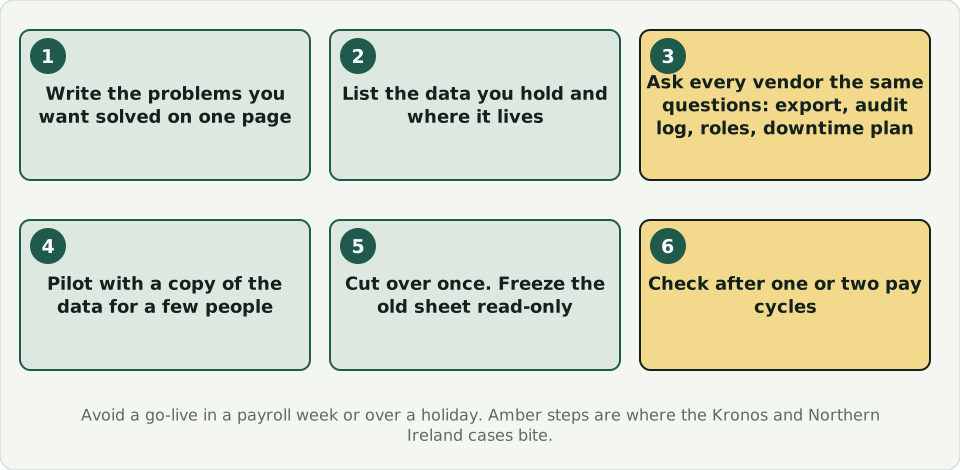
- Write the problems you want solved on one page.
- List the data you hold and where each item lives.
- Ask vendors the same questions: how do I export all my data, is there an audit log, what roles exist, where is data stored, what is your downtime plan, and what happens to my data if I leave?
- Pilot with a copy of the data for a few people. Compare reports with your spreadsheet.
- Move in one cut-over, then freeze the old spreadsheet in a read-only archive. Avoid a go-live during a payroll week or a holiday.
- Check after one or two pay cycles that nothing changed unexpectedly.
Do not forget the people side
Tell employees what is stored, who can see it and how to correct a mistake. The FTC's guide for businesses suggests keeping only what you need and disposing of what you no longer need. That applies to a new system as much as an old file.
General information, not legal advice. Reported figures come from the cited sources.
Sources
- Law Society Gazette (Ireland): £750,000 fine for PSNI over data breach, October 2024
- Infosecurity Magazine: PSNI £750,000 data breach fine
- BBC: Why using Excel caused Covid-19 results to be lost
- U.S. Department of Labor: fiscal year 2025 back wages
- U.S. Department of Labor: Wage and Hour Division data
- U.S. Department of Labor: Fact Sheet #21, FLSA recordkeeping
- IBM: 2025 Cost of a Data Breach Report
- Baker Botts: Kronos agrees to a $6 million settlement
- Legal Dive: UKG to settle class action over the Kronos outage
- Cybersecurity Dive: Cargill's $2.4M Kronos settlement
- HR Dive: UMass Memorial's $1.2M Kronos settlement
- FTC: Protecting Personal Information, A Guide for Business