In this article
A Mini HRIS Data Model You Can Build in a Spreadsheet or Database, and Why the Structure Matters
Official sources checked: November 9, 2026. AI-assisted draft, pending editor review.
A good HR record system is mostly about structure, not software. If the structure is right, you can start in a spreadsheet and move to a database or a bought HRIS later without starting over. This is a small data model for a company with a handful of employees, with the reasoning for each choice.

Why structure matters, in numbers
- Retention periods are specific. Federal payroll records must be kept at least three years, and time cards and wage computation records two years. California requires automated-decision data from hiring tools for at least four years, and Colorado's new act at least three. A table with dates and history lets you answer "what was true then" without guessing.
- Wage violations cost real money. In fiscal year 2025 the U.S. Wage and Hour Division recovered more than $259 million in back wages for 176,957 employees, about $1,465 per worker.
- A limit you did not test can leave data out. Public Health England's older Excel format held about 65,000 rows, and 15,841 positive Covid cases were left out of reports for about a week in 2020. Design for growth: a database, or at least a tested sheet, rather than a file with a hard limit nobody has checked.
- Hidden data travels with the file. The Police Service of Northern Ireland released a spreadsheet in 2023 with a hidden tab that listed surname, initials, rank and role of all 9,483 officers and staff, and was fined £750,000 by the UK regulator. Keep sensitive fields in a separate protected store and share only exports you have checked.
- Vendors fail too. After the 2021 Kronos outage employers had to pay people from manual records or earlier payrolls. A clean export of your own data is your fallback.
Five rules first
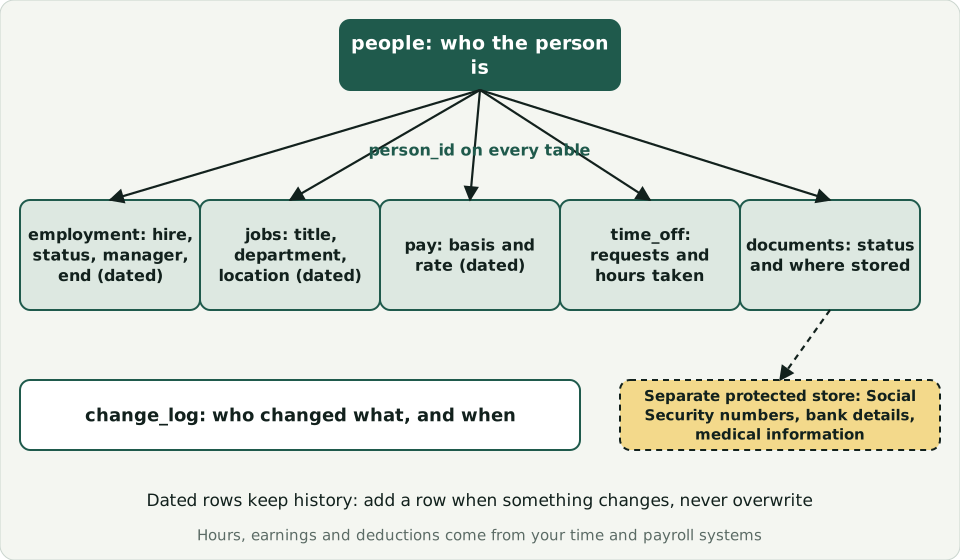
- One permanent ID per person, never reused, never based on a name or number like a Social Security number.
- History as new rows. When pay or title changes, add a row with an effective date. Do not overwrite.
- One fact in one place. Store the pay rate in the pay table only, and the hire date only as the first row in the employment history.
- Sensitive data apart. Keep Social Security numbers, bank details and medical information out of the main sheet, in a protected place with limited access.
- A log of changes. Who changed what and when, even if it is a simple sheet.
Six tables
| Table | What it holds | Key fields |
|---|---|---|
| people | Who the person is | person_id, legal name, preferred name, work email |
| employment | Hire, status changes, manager and end, over time | person_id, effective date, status (hired, active, on leave, ended), worker type, manager id |
| jobs | Job and department over time | person_id, title, department, location, effective date |
| pay | Pay over time | person_id, pay basis (hourly or salary), rate, effective date, recorded at, reason |
| time_off | Requests and hours taken (balances are calculated from your policy) | person_id, type, date, hours, status |
| documents | Where a document is, not the document | person_id, document type, status, date received, storage location |
What the law says you must be able to produce
For covered workers, the U.S. Department of Labor's recordkeeping fact sheet lists what employers must keep, including name and Social Security number, address, hours worked each day and week, basis of pay, regular hourly rate, straight-time and overtime earnings, additions to and deductions from wages, total wages each pay period, and the date of payment. Payroll records must be kept at least three years, and time cards and wage computation records two years. Hours, earnings and deductions are normally produced by your time and payroll systems, not by this model. What the model should do is hold the person ID that links to those records and make sure you can export them for a person and a period. Ask your payroll provider how.
A sample schema
A starting point you can adapt. Table and column names are only examples.
CREATE TABLE people (person_id INTEGER PRIMARY KEY, legal_name TEXT NOT NULL, preferred_name TEXT, work_email TEXT UNIQUE);
CREATE TABLE employment (person_id INTEGER NOT NULL REFERENCES people, effective_date DATE NOT NULL, recorded_at TIMESTAMP NOT NULL, status TEXT NOT NULL, worker_type TEXT NOT NULL, manager_id INTEGER REFERENCES people, PRIMARY KEY (person_id, effective_date, recorded_at));
CREATE TABLE jobs (person_id INTEGER NOT NULL REFERENCES people, title TEXT NOT NULL, department TEXT, location TEXT, effective_date DATE NOT NULL, recorded_at TIMESTAMP NOT NULL, PRIMARY KEY (person_id, effective_date, recorded_at));
CREATE TABLE pay (person_id INTEGER NOT NULL REFERENCES people, pay_basis TEXT NOT NULL CHECK (pay_basis IN ('hourly','salary')), rate NUMERIC NOT NULL, effective_date DATE NOT NULL, recorded_at TIMESTAMP NOT NULL, reason TEXT, PRIMARY KEY (person_id, effective_date, recorded_at));
CREATE TABLE time_off (person_id INTEGER NOT NULL REFERENCES people, leave_type TEXT NOT NULL, leave_date DATE NOT NULL, hours NUMERIC NOT NULL, status TEXT NOT NULL);
CREATE TABLE documents (person_id INTEGER NOT NULL REFERENCES people, doc_type TEXT NOT NULL, status TEXT NOT NULL, received_date DATE, storage_location TEXT);
CREATE TABLE change_log (id INTEGER PRIMARY KEY, changed_at TIMESTAMP NOT NULL, changed_by TEXT NOT NULL, table_name TEXT NOT NULL, person_id INTEGER, note TEXT);
Ask "as of" questions
The reason for effective dates is to answer questions about the past: what was this person's pay on March 1, who was their manager last quarter, how many people worked here in June? If a question like that cannot be answered, add a date column, not a new tab of notes.
Access and privacy
Decide who can see which table before you build. Managers may need names and job titles, not pay. Payroll needs pay, not medical information. The FTC's business guide advises keeping only what you need and protecting what you keep.
Where AI can help, and where not
AI tools can help you draft the schema, write validation formulas and clean column headings, using made-up example data. Do not paste real employee records into a general-purpose tool. See AI Tools and Employee Data. If you outgrow the spreadsheet, see From Spreadsheet to HRIS.
General information, not legal advice. Confirm current requirements with the official sources below.
Sources
- U.S. Department of Labor: Fact Sheet #21, FLSA recordkeeping requirements
- U.S. Department of Labor: fiscal year 2025 back wages
- BBC: Why using Excel caused Covid-19 results to be lost
- Cybersecurity Dive: Cargill's $2.4M Kronos settlement
- Law Society Gazette (Ireland): £750,000 fine for PSNI over data breach, October 2024
- FTC: Protecting Personal Information, A Guide for Business