In this article
- Form I-9 completion deadlines and review method
- What ICE's current inspection guidance actually says
- Mistake 1: Section 1 is missing a date
- Mistake 2: Section 2 was finished on Friday
- Mistake 3: You asked for a specific document
- Mistake 4: The form edition is out of date
- Mistake 5: Old forms were thrown away too early, or kept forever
- Form I-9 mistakes and fixes, side by side
- Correct the error without hiding the original record
- Document expiration does not always mean reverification
- A completed correction still needs a follow-up decision
Form I-9 Mistakes Small Businesses Make, and How to Fix Them
Official sources checked: October 28, 2026
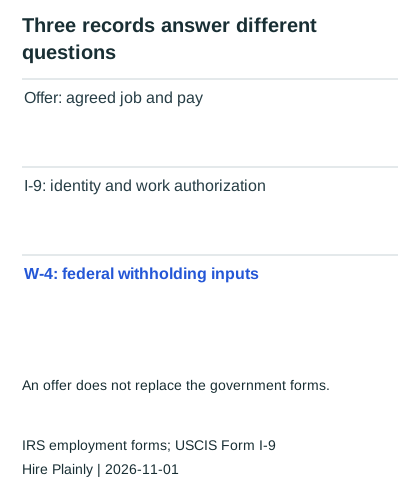
What happens if a new employee starts work before you have finished checking the hiring paperwork? A small-business owner hires employee A on Monday, October 19, 2026, and opens her Form I-9(employment-eligibility verification form) folder on Friday. Section 1 has a signature but no signature date, and the owner has only just examined her documents. This hypothetical hire exposes two different Form I-9 mistakes: missing information that the right person can correct and a completion deadline that has already passed.
The dates below assume an ordinary Monday-through-Friday business week with no intervening holiday. A is a new employee performing work for pay in the United States, not an independent contractor. The process applies to U.S. citizens as well as other covered new hires; citizenship is not a reason to skip the form.
Form I-9 completion deadlines and review method
The employee completes Section 1 no later than the first day of work for pay. The employer completes Section 2 within three business days after that start date, or by the first day if the job will last fewer than three business days. For A's October 19 start, the ordinary Section 2 deadline is Thursday, October 22.
Give the employee the acceptable-documents list and instructions. Review original acceptable documents in person unless you qualify for and follow a DHS-authorized alternative procedure; a casual video call is not a substitute. Keep the completed form in the employer's records rather than submitting it to USCIS. Download the actual form and instructions from USCIS, checked October 28, 2026.
What ICE's current inspection guidance actually says
The ICE inspection fact sheet available at this review is dated August 31, 2026. It lists missing Section 1 dates of birth and signature dates as substantive violations. It also distinguishes technical or procedural failures, for which a notice allows at least 10 business days to correct, from substantive violations and uncorrected technical failures that can support fines.
That distinction does not mean every blank field produces an automatic fine or that an internal correction erases a violation. A missing optional telephone number is different from an omitted attestation date, and a late completion cannot become timely through backdating. If an inspection notice arrives, preserve the records and obtain qualified immigration counsel rather than guessing which category applies.
Mistake 1: Section 1 is missing a date
She signed Section 1 but left the date next to her signature blank, and the date of birth field is empty too. Both look minor, yet both appear in ICE's current list of substantive violations. An auditor reading the form can't confirm when she attested to her status, which is the whole point of Section 1.
The fix is to have the employee complete the missing fields herself, then initial and date the additions with today's date. Don't fill in her section for her, and don't write the original date as if it had been there all along. A correction dated today is honest, while a backdated one can turn a paperwork problem into a much more serious one.
Mistake 2: Section 2 was finished on Friday
You reviewed A's documents on Friday, October 23, although her ordinary completion deadline was Thursday, October 22. Section 2 was therefore one business day late. Late completion is a substantive violation, and unlike a blank field, you can't fix it by adding something to the form.
What you can do is write a short, dated note explaining when Section 2 was completed and why, and attach it to the form. The note doesn't erase the violation, but it shows good faith, which is one of the factors used to set a penalty. Assign the reviewer and calendar the deadline when the offer is accepted, then confirm the actual start date before completing Section 2.
Mistake 3: You asked for a specific document
Your onboarding email said, "Please bring your passport for the I-9." That feels helpful, but the employee gets to choose which acceptable documents to present, either one from List A or one each from Lists B and C. Telling someone which document to bring, or rejecting valid documents because you'd prefer others, can be treated as an unfair documentary practice under anti-discrimination rules.
The fix is to send the full list of acceptable documents, which USCIS publishes with the form, and let the employee pick. The same principle applies if you photocopy documents by choice: copy them for every employee or for none, so the practice looks the same for everyone. There are required exceptions, though. E-Verify employers must keep copies of certain documents used for photo matching, and employers that use the remote examination option must keep copies of everything they review.
Mistake 4: The form edition is out of date
Someone printed a stack of blank I-9s a few years ago, and the form in the folder is an older edition. Using an expired edition for a new hire is a violation in itself, and it's an especially easy one to miss because the form looks almost identical.
Check the edition date printed in the lower corner of each blank form against the current edition on the USCIS I-9 page before every hire. On October 28, 2026, USCIS's main form page lists edition 01/20/25 and also permits edition 08/01/23 with expiration 05/31/2027. The 08/01/23 version expiring 07/31/2026 is past its stated validity period, so it should not be used for a new October hire. A form that was correctly completed on the edition that was current at the time generally doesn't need to be redone just because a newer edition came out.
Mistake 5: Old forms were thrown away too early, or kept forever
Retention trips people up in both directions. Throwing out a form too soon is a violation, while keeping forms for people who left long ago means more paper an auditor can review. For current employees, keep the form for as long as they work for you. Once someone leaves, the rule is three years after the date of hire or one year after employment ends, whichever date is later.
A simple way to apply it is to write the purge date on each form's folder tab when someone leaves. Suppose A later leaves on May 15, 2028. Three years after her October 19, 2026 hire is October 19, 2029; one year after departure is May 15, 2029. The later date is October 19, 2029, so that is her retention threshold. Do not destroy a record subject to an inspection, litigation hold or other applicable preservation requirement.
Form I-9 mistakes and fixes, side by side
Read the "How to fix it" column first, since each fix is something you can do this week.
| Mistake | Why it's a problem | How to fix it |
|---|---|---|
| Blank date or date of birth in Section 1 | Listed as substantive in ICE's August 31, 2026 guidance | Employee completes it, initials and dates today |
| Section 2 done after three business days | Late completion can't be undone | Attach a dated note; calendar the deadline at offer |
| Asking for a specific document | Possible unfair documentary practice | Send the full acceptable-documents list |
| Outdated form edition | Violation for new hires | Check the edition date before every hire |
| Wrong retention | Too early is a violation; too late adds exposure | Write the purge date when someone leaves |
Correct the error without hiding the original record
USCIS's correction instructions assign Section 1 corrections to the employee and Section 2 or Supplement B corrections to the employer. For an ordinary incorrect entry, draw one line through it, add the correct information, and initial and date the correction. A missing entry is added by the responsible person with the actual correction date; do not copy the hire date into today's correction notation.
The earlier advice to never redo a form was too broad. USCIS permits redoing a section on a new form and attaching it to the old one for multiple recording errors, or completing a new form for major errors such as an entirely blank section. Keep the original and a signed, dated explanation of the reason. A replacement is a documented correction, not a way to conceal that the first form was late or incomplete.
| A's hypothetical review record | Owner or action | Completion evidence |
|---|---|---|
| Section 1 signature date and date of birth missing | Ask A to complete her entries honestly | A's correction initials/date; preserve original entries |
| Section 2 completed October 23 | Employer records actual examination/completion date | Signed explanation of lateness; no backdating |
| Specific passport request sent | Employer replaces onboarding message with full acceptable-document list | Updated standard message; employee retains document choice |
| Form edition check | Employer compares edition and expiration with main USCIS form page | Edition/expiration recorded in restricted onboarding checklist |
| Departure May 15, 2028 | Employer calculates later retention date | October 19, 2029 retention threshold, subject to applicable holds |
This checklist is an operating aid and should not contain copied Social Security numbers or document images in a broadly shared spreadsheet. Store the underlying I-9 and any required document copies securely, with access limited to people who need them. Review all current employees' forms under a consistent process, then apply the same steps to former employees' forms still within retention.
Document expiration does not always mean reverification
An expiring document is not automatically an instruction to ask the employee for a replacement. Do not reverify U.S. citizens or noncitizen nationals, and do not reverify a lawful permanent resident merely because a Permanent Resident Card used for the I-9 expires. List B identity-document expiration also does not itself require reverification. Where temporary employment authorization does require it, check the applicable current extension or receipt rules before deciding what must happen by the deadline.
For required reverification, the employee chooses an acceptable List A or List C document showing continued authorization; do not demand the same document used at hire. DOJ's IER FAQ explains these distinctions. These are different tasks from a state new-hire report or payroll setup, even if the owner completes them during the same week. Keep the free official-resource directory available for the form and agency guidance.
A completed correction still needs a follow-up decision
Suppose Section 2 was completed late and the employer now discovers the omission. Record the actual start date, actual completion date and the steps taken under current USCIS instructions. Do not replace the late date with the date that should have been used. Making the record complete does not erase the original timing issue.
Use an anonymous employee reference in the operating log, with the correction owner and next review date. Keep document numbers, citizenship details and identity-document images out of that log. A serious or disputed finding belongs with the authorized reviewer or immigration counsel before the owner closes it.
This article is general information, not legal or immigration advice. Talk to an immigration attorney about your situation.